
Summarize with:
read in < 1 min
On paper, a data center migration looks like moving day. Pack the racks, ship them, plug them in. In reality, you are rewiring a live business while it keeps running. The servers are the easy part. The plan usually breaks somewhere else. And the stakes keep rising: workloads are heavier, data volumes are bigger, and tolerance for disruption is close to zero.
The “lift and shift” illusion
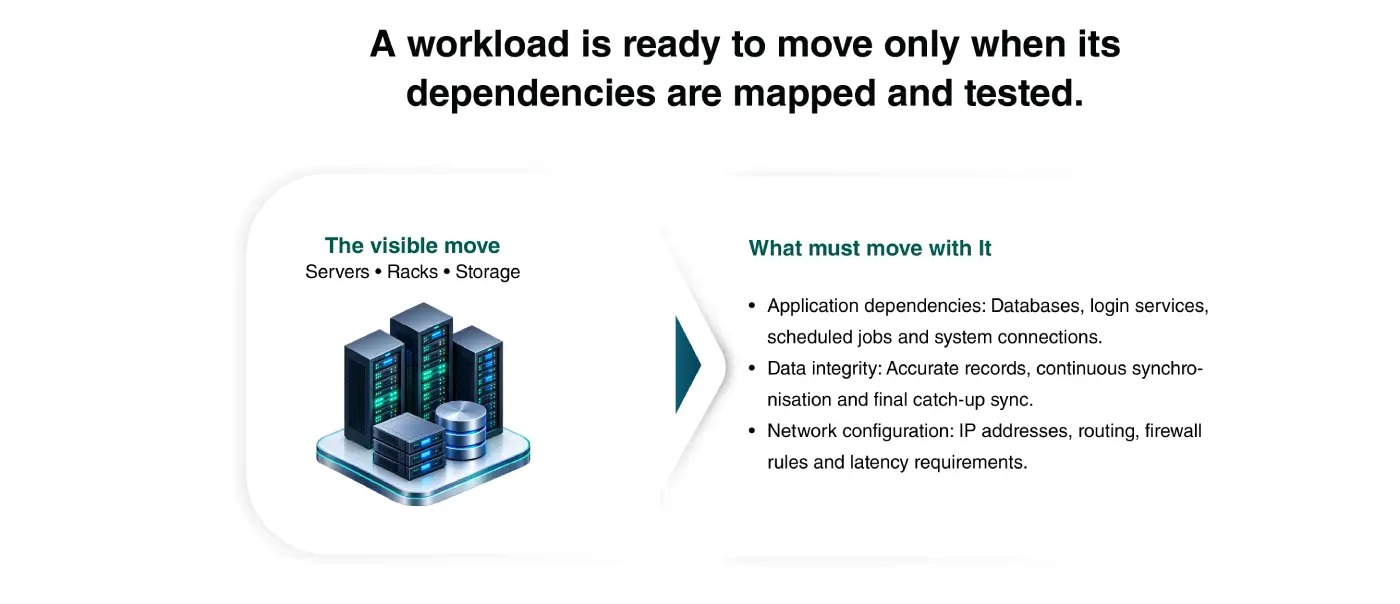
Lift and shift mean moving workloads as they are, with no redesign. It’s popular because it’s simple to explain. But no workload runs alone. It leans on databases, login services, scheduled jobs and network rules, and many of those were never written down. Move the visible part, and the invisible part can stop working. A plan built only on server counts and rack space tends to miss all of this.
What sits beneath the workload?
Application dependencies: These are the hidden links between systems. Practitioners keep returning to the same advice: a complete, current dependency map is a must before any move. Nutanix goes further and says hidden dependencies cause most migration failures and post-migration outages. That is a vendor view, but it matches what most IT teams report.
Data migration: It’s not only about volume. You have to keep data accurate and in sync between old and new until the final switch. A good plan includes a final catch-up sync of recent changes and a simple check, such as record counts, that proves the data arrived intact.
Network changes: IP addresses, routing, firewall rules and latency all shift with a new location. An application that sat one hop from its database may now sit many. This matters beyond the move itself: Uptime Institute notes that outages are increasingly originating outside the data center, including network connectivity.
Downtime, testing and timing
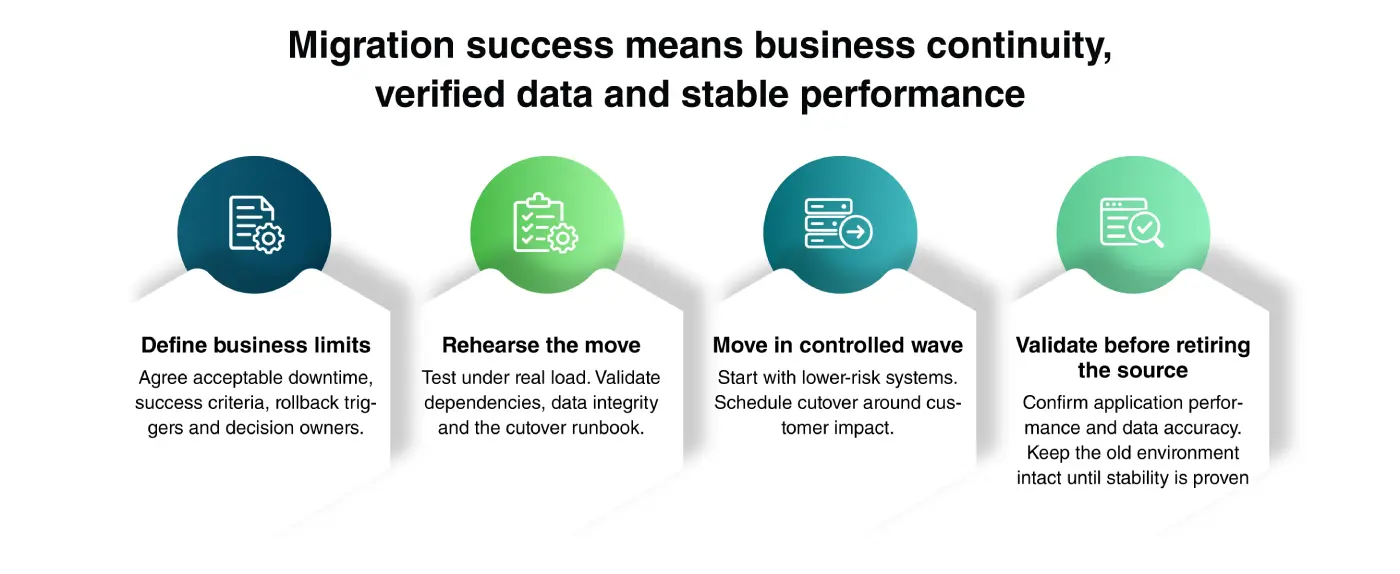
“Minimal downtime” is a business definition, not a technical one. What does an hour offline mean for orders, payments or patients? Outages are expensive: in Uptime Institute’s 2026 analysis, 57% of respondents said their most recent major outage cost more than $100,000.
Testing should mirror real load, not just tick a checklist. A missing test plan can derail an entire move, and so can poor coordination. Steps that run too early, or teams waiting on each other without knowing it, stretch both the schedule and the downtime. Uptime also notes that failing to follow established procedures remains the leading cause of human-error outages. So rehearsed runbooks matter as much as good hardware. Then comes cutover, the moment traffic switches from old to new. Choose that window around your customers, not your calendar.
Three Situations CIOs can Relate to
- The forgotten link: An application goes live and fails quietly because it still calls a server that was switched off.
- The sync gap: Data copied last week doesn’t match data changed yesterday, and the team finds out after cutover.
- The slower app: A network change adds a few milliseconds, and a critical workflow starts to crawl.
Rollback: the plan behind the plan
Rollback is the ability to return safely to the old setup. Treat it as confidence building, not pessimism. Agree the trigger in advance, keep the source environment intact until the new one is stable, and test the rollback itself. Move in waves, with lower-risk systems first, so continuity is protected at every step. Uptime’s data shows per-site outage frequency has declined for five years running, yet costs keep edging upward. The price of a failed cutover is not shrinking.
Questions to ask before you move
- Do we know every dependency, including the undocumented ones?
- What exactly triggers a rollback, and who decides?
- How will we verify data integrity at cutover?
- Who owns each stage?
- What does success look like on day one and day 90?
- Does the destination have room to grow if a wave needs more capacity than planned?
The CtrlS perspective: where the workload lands matters
A migration plan is only as flexible as the facility it lands in. CtrlS runs 19 data centers across 9 Indian cities, with over 370 MW of operational capacity by FY26 and a roadmap to 2 GW by 2030. Colocation here scales with you, from individual racks and secure cages to private data halls, dedicated floors and complete buildings. The rack counts show the depth: Mumbai DC1 and DC2 offer 5,555 racks and 42 MW, Hyderabad DC3 offers 3,500 racks, and Mumbai DC5 offers 2,750 racks. All of it is backed by Rated-4 design, a 99.995% uptime SLA and nine-zone security, and trusted by 60 Fortune 500 companies.
For a CIO’s perspective, that means you can land the first wave in a few racks, add capacity as each wave arrives, and grow into a hall or floor without moving again.

Praneeth Busireddy, VP - Enterprise Colocation Sales, CtrlS Datacenters
Praneeth is a seasoned IT professional with over 20 years of industry experience. Currently, he leads Mid-Market business across India and manages colocation services for Telangana and Andhra Pradesh. With deep industry expertise, strong business acumen, and extensive experience in datacenter services, Praneeth brings valuable insights and leadership to every engagement.

 marketing@ctrls.in