
The enterprise AI conversation is moving beyond experimentation, sandboxes and proofs of concept. Organizations are now beginning to embed AI into day-to-day business operations, making GPU infrastructure a foundational part of their technology environment. At this stage, however, the challenge is no longer simply the cost of GPUs. It is how effectively those GPUs are being utilized.
GPU utilization also varies significantly across AI workloads. Training, retraining and fine-tuning workloads tend to generate sustained and relatively predictable GPU demand. Inference workloads, on the other hand, can be highly variable, sporadic and difficult to provision efficiently. Agentic AI workloads can amplify this challenge further, creating bursts of demand interspersed with periods of low utilization. Without the right infrastructure governance, organizations can end up paying for GPU capacity that delivers little useful compute.
The economic implications of this underutilization are significant. A Kubernetes optimization report found that GPU utilization across production clusters was just 5%. Importantly, this was based on direct measurements of production clusters and millions of compute resources, rather than survey responses or estimates. The finding highlights a less visible problem for enterprises building AI infrastructure: the cost of AI can start accumulating long before AI reaches production.
For enterprises operating in a price-sensitive market such as India, GPU utilization is therefore not merely an engineering metric. It is increasingly a business, governance and financial metric.
The GPU Utilization Problem: Paying for Silicon You Don’t Fully Use
Training a foundation model, fine-tuning an existing model or running inference at scale can require substantial GPU resources.
An enterprise might provision a set number of GPUs for a training job, only to discover that several GPUs spend significant portions of their time waiting for data, synchronization, storage or other resources.
The result is a utilization gap.
The organization sees a cluster with GPUs allocated to AI teams. The finance team sees infrastructure expenditure. But neither necessarily has visibility into how much useful compute is actually being delivered for money spent.
This gap becomes particularly important as enterprises expand their AI footprint. More models mean more teams, more jobs, more queues and more competing demands for scarce GPU capacity.
The question consequently shifts from:
“How many GPUs do we have?”
to:
“How much useful AI compute are we getting from the GPUs we have?”
Before organizations can improve utilization, however, they need to understand what is preventing GPUs from operating efficiently in the first place.
What Kills GPU Utilization?
GPU underutilization is usually the result of several infrastructure and operational bottlenecks interacting with each other.
1. Fragmented Queues
As AI adoption spreads across an organization, different teams often create their own workflows, queues and resource requests.
One team may reserve a large GPU pool for training. Another may need GPUs for inference. A third may be running experimentation or fine-tuning jobs.
Without centralized orchestration, these workloads can leave small pockets of capacity stranded.
A GPU may technically be “allocated” while contributing little useful compute because it is waiting for a job, waiting for other GPUs in a distributed workload or sitting unused because the requesting team has temporarily paused its work.
Fragmented queues turn a shared infrastructure problem into a collection of isolated utilization problems.
2. Inefficient Scheduling
GPU workloads are not interchangeable.
Different models have different memory requirements, compute characteristics, inter-GPU communication patterns and execution times. Sending the wrong workload to the wrong GPU—or reserving too many GPUs for a workload—can reduce overall cluster efficiency.
Poor scheduling can also create a situation where a high-priority workload waits while available capacity remains unused elsewhere in the cluster.
Effective GPU infrastructure therefore requires more than simply assigning jobs to available GPUs. It requires intelligent placement based on workload requirements, priority, resource availability and expected execution behaviour.
3. Data Bottlenecks
A GPU can process data extremely quickly. If the data pipeline cannot keep up, the GPU waits.
Data loading, pre-processing, transformation, network transfer and storage access can all become bottlenecks.
From the GPU’s perspective, the problem is simple: there is nothing to compute.
The organization, however, is still paying for the GPU.
This is one of the most important distinctions in AI infrastructure economics. Improving GPU utilization does not necessarily mean making the GPU work harder in isolation. It means ensuring that the entire infrastructure stack from storage and networking to data pipelines and scheduling can continuously feed useful work to the accelerator.
4. Over-Provisioning
Teams often request more resources than their workloads actually require.
This is understandable. When a training job is business-critical, teams would rather have additional capacity available than risk running out of resources.
But repeated over-provisioning creates stranded capacity.
A workload that requires a particular amount of GPU memory and compute may be allocated substantially more than necessary. The excess capacity cannot always be easily reassigned, especially when workloads are poorly scheduled or tightly coupled.
5. Poor Batch and Parallelism Configuration
GPU performance can vary significantly depending on how workloads are configured.
Batch size, micro-batching, tensor parallelism and other execution parameters affect GPU memory consumption and compute utilization.
An incorrectly configured workload may leave GPU memory underused or create computational inefficiencies that prevent the accelerator from operating near its potential.
In other words, owning a powerful GPU does not guarantee that the workload is configured to exploit it.
Seven Levers for Improving GPU Utilization
Improving utilization requires organizations to treat the GPU cluster as a governed infrastructure environment rather than simply a collection of accelerators.
Seven levers are particularly important.
1. Scheduling
Intelligent scheduling optimizes job dispatching and placement based on resource requirements, workload priority and available capacity.
Instead of allocating GPUs statically, scheduling can help consolidate workloads, reduce waiting time and prevent capacity from becoming stranded.
For enterprise AI environments, this is foundational. Better scheduling can improve utilization without requiring the organization to purchase additional GPUs.
2. Data Pipeline Optimization
Data pipelines should be designed around the processing capabilities of the GPU infrastructure.
This includes optimizing, pre-processing, data loading, caching, data transfer and pipeline parallelism so that the accelerator receives work continuously.
A fast GPU connected to a slow data pipeline is an expensive bottleneck.
3. Storage
Modern GPUs can consume data at extremely high rates. Traditional storage architectures may struggle to provide the throughput and latency required by demanding AI workloads.
High-performance storage, appropriate data placement, caching and optimized access paths can reduce the time GPUs spend waiting for data.
The objective is not simply faster storage. It is aligning storage performance with compute performance.
4. Batching
Batching determines how much work is presented to the GPU at a time.
Organizations can tune micro-batch and macro-batch sizes to improve throughput while respecting GPU memory constraints. For distributed workloads, tensor parallelism and related strategies can also influence how efficiently compute resources are used.
The optimal configuration varies by workload. The key is to measure rather than assume.
5. Right-Sizing
Not every AI workload requires the same amount of GPU memory or compute.
Right-sizing means allocating the appropriate resources for each workload rather than defaulting to the largest available configuration.
This can prevent over-provisioning and make more capacity available to other workloads.
For finance leaders, right-sizing is particularly important because it directly connects infrastructure configuration to cost.
6. Autoscaling and Dynamic Provisioning
AI workloads are rarely constant.
Training jobs may create significant bursts in demand. Inference workloads can fluctuate based on application usage. Development and experimentation may be highly variable.
Autoscaling and dynamic provisioning can help organizations scale capacity up when demand requires it and reduce or consolidate capacity when demand falls.
7. Governance and Queue Management
As multiple AI teams compete for GPUs, governance becomes essential.
Role-Based Access Control (RBAC) adds another layer of control by defining who can access GPU resources, which resources they can access and what actions they are authorized to perform.
RBAC also strengthens queue management by establishing clear ownership and permissions around workload submission, prioritization and resource allocation. Combined with quotas and fair-share policies, it helps ensure that a small number of teams or users cannot monopolize shared GPU capacity.
Governance: You Cannot Optimize What You Cannot See
The above levers provide mechanisms for improving GPU utilization. But organizations still need one fundamental capability and that is governance.
A mature GPU governance framework should connect infrastructure metrics with workload and business context. It should provide visibility across GPU compute utilization, memory utilization, job duration, queue wait time, storage throughput, data pipeline performance, workload allocation and resource consumption.
From GPU Utilization to Cost Optimization
The financial implications of GPU utilization become more significant as AI infrastructure scales.
GPUs are expensive to acquire and operate. Their cost is not limited to the accelerator itself. Enterprises also incur expenditure associated with servers, networking, storage, power, cooling, datacenter capacity, software and operations.
Ultimately, the cost of this infrastructure flows to the business consuming the AI capability.
Whether GPUs are deployed in an enterprise datacenter, through a managed infrastructure model or through public cloud services, poor utilization can translate into higher effective compute costs.
Before and After: From Infrastructure Consumption to Infrastructure Intelligence
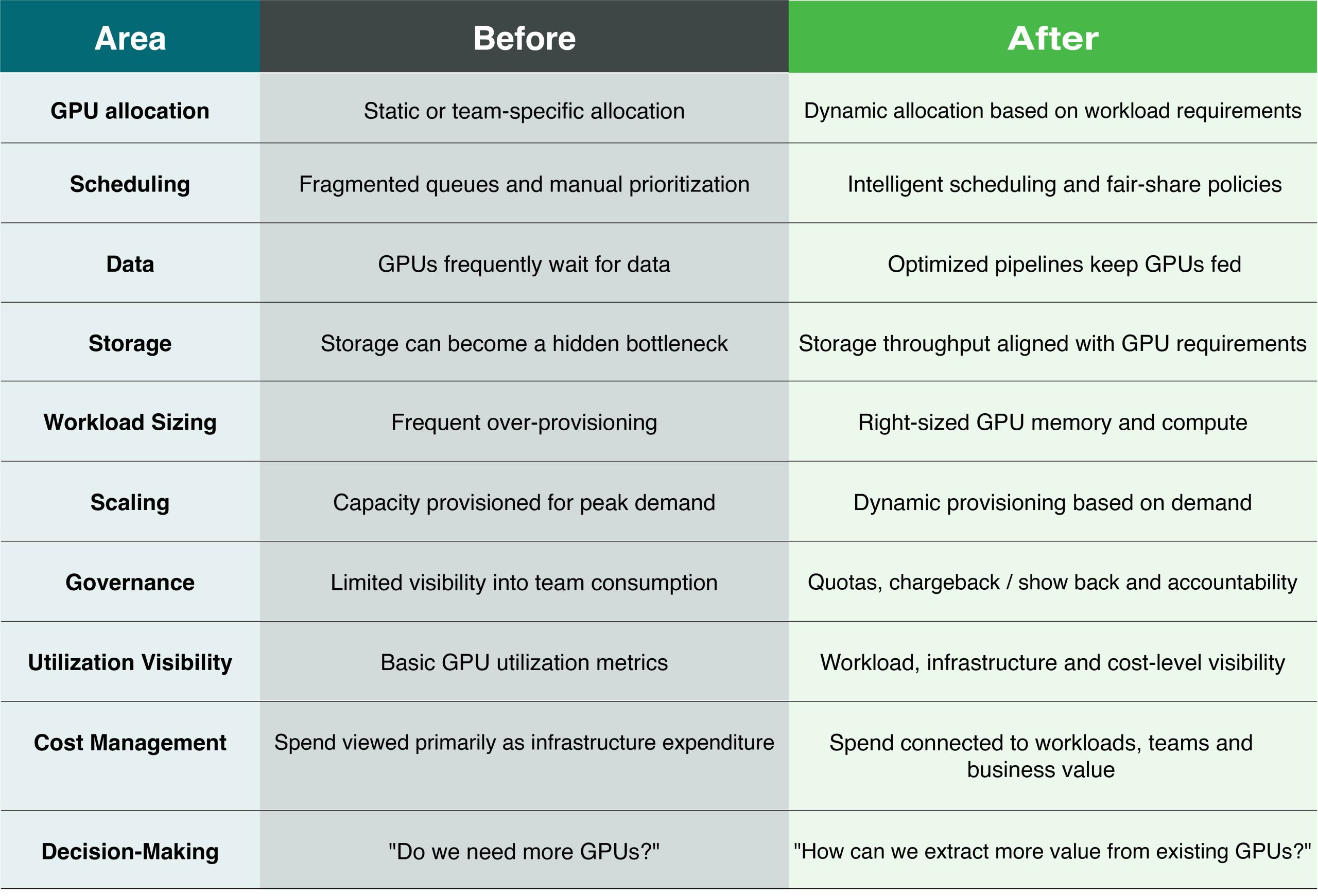
The most important transformation is not necessarily a reduction in the number of GPUs.
It is the ability to make better decisions about the GPUs already deployed.
An organization that improves utilization can potentially postpone additional hardware acquisition, reduce wasted capacity, improve workload throughput and lower the effective cost of AI experimentation and production.
The Bigger Opportunity: Make Every GPU Count
AI infrastructure is entering a phase where availability alone is not enough.
Enterprises need to know whether their GPU infrastructure is producing the maximum possible value.
That requires connecting seven operational levers like scheduling, data pipelines, storage, batching, right-sizing, autoscaling and governance. An observability layer that provides continuous insight into how workloads consume infrastructure creates a multiplier effect in utilization.
A Smarter Approach to AI Infrastructure Economics
GPU infrastructure is becoming one of the most important components of enterprise AI strategy. But simply adding more GPUs is not always the answer.
Before investing in additional capacity, enterprises should understand how effectively their existing infrastructure is being used – and where opportunities exist to improve utilization, optimize provisioning and control infrastructure costs.
This is where CtrlS’ Accelerated Cloud Platform helps enterprises build a more efficient and governed AI infrastructure environment.
Accelerated Cloud Platform provides visibility into how GPU resources are being consumed. This enables organizations to establish better governance around allocation, utilization and resource ownership. Clear governance helps identify inefficiencies, improve resource utilization and optimize existing GPU capacity, ultimately leading to a more efficient and scalable infrastructure foundation for enterprise AI.

For enterprises building in-house AI capabilities, this solution can help move GPU infrastructure from simply being a high-cost compute resource to a measurable, optimized and governed enterprise asset.
As AI workloads scale, the ability to understand where GPUs are being consumed, provision capacity according to actual demand and continuously optimize infrastructure becomes increasingly important.
To understand how your organization can build an efficient, observable and cost-governed AI-ready infrastructure environment, connect with the experts at CtrlS.

Venkat Subrahmanyam, Vice President – Service Delivery, Managed Services, CtrlS Datacenters
With over 18 years of experience driving large-scale technology transformation and business growth, Venkat is a results-oriented leader who has led complex, multi-domain programs across datacenter services, cloud, cybersecurity, and infrastructure operations. He brings deep expertise in end-to-end transition and transformation, ensuring measurable ROI, governance excellence, and delivery efficiency. Venkat has extensive experience managing MeitY portfolios, aligning operations with regulatory and national digital mandates. Known for his strategic influence, he mentors high-performing teams and builds strong C-suite partnerships.

 marketing@ctrls.in